[Tutorial] Manga Art ¤ Tutorial

Shinato

Anbu Operative 🎭
Veteran
Joined
Mar 27, 2013
Messages
2,810
Reaction score
514
You must be registered for see images


What will you learn in this tutorial?
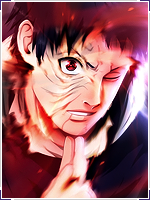
This tutorial will teach you how to create the Manga Art style I've been using for my latest avatars/signatures/banners to create whatever type of art you want using Manga art. To be more precise, this is what you will learn:

  • How to remove the white from a manga page.
  • How to color behind lines.
  • How to alter line colors and background colors.
  • How to edit lines.

What programs will be used?​
For this tutorial, only a single program will be used and that will be Adobe Photoshop CC. All the resources I link to will be purely for Adobe Photoshop so if you are using another program then these resources will not work for you.


You must be registered for see images


Finished Image​

You must be registered for see images


Six Paths

Kage in the Making 👑
Legendary
Joined
Oct 27, 2012
Messages
16,506
Reaction score
1,135
About time you do one. Thanks...
 

Anonn

Banned
Veteran
Joined
Jan 16, 2013
Messages
4,265
Reaction score
676
Thanks for sharing bruh, already know this but for those who don't this is a great small tutorial!
 

Shinato

Anbu Operative 🎭
Veteran
Joined
Mar 27, 2013
Messages
2,810
Reaction score
514
Thanks for sharing bruh, already know this but for those who don't this is a great small tutorial!


I mainly did this because for some strange reason, this style got fairly popular and I created a custom action to make this easier to do. Though, thank you! (And thanks to everyone!)


Phobos

Sannin of the Scrolls 📜
Elite
Joined
Jan 31, 2011
Messages
8,678
Reaction score
201
Could help some1 I guess, isn't it easier to put your gray color over your manga scan with "darken" layer? For coloring just use "screen" or similiar.
 

Shinato

Anbu Operative 🎭
Veteran
Joined
Mar 27, 2013
Messages
2,810
Reaction score
514
Could help some1 I guess, isn't it easier to put your gray color over your manga scan with "darken" layer? For coloring just use "screen" or similiar.


That will leave hard edges and cuts, that lowers the quality of the drawing. (Hence why removing the white is a better way and it also make color, editing much easier.)


Phobos

Sannin of the Scrolls 📜
Elite
Joined
Jan 31, 2011
Messages
8,678
Reaction score
201


That will leave hard edges and cuts, that lowers the quality of the drawing. (Hence why removing the white is a better way and it also make color, editing much easier.)


Hard edges and cuts? That's not possible, but if you don't belive me..
Here I did this in a minute, gray layer darken and overlay blue.
You must be registered for see images
 

Shinato

Anbu Operative 🎭
Veteran
Joined
Mar 27, 2013
Messages
2,810
Reaction score
514
Hard edges and cuts? That's not possible, but if you don't belive me..
Here I did this in a minute, gray layer darken and overlay blue.
You must be registered for see images


There is a darker blue outline around the blue, which is visible. (My method avoids that, as there is always slightly lighter on the outside of the lines.) Beyond that, you cannot clip and cut lines together as easy without first removing the white. Which I do from time to time, seen in the finished version of the example in this tutorial.


Xlad

Legendary Shinobi 🐸
Supreme
Joined
Dec 10, 2012
Messages
21,625
Reaction score
2,033
Excellent thread.
 
Top