[Gimp] My First Attempt At Renders & Sigs

Hokage Sharingan Kakashi

Leaf Village Regular 🍃
Regular
Joined
May 17, 2012
Messages
832
Reaction score
125
Okay so last night while I was downloading a movie which was taking forever to finish so I decided to mess around with Gimp 2 to see if I could finally understand how the damn thing worked. After about 20-25 minutes I got an insight of how I works, nothing big though. I learned how to make my own renders so I won't have to ask and took two attempts at making a sig. Lol the sigs didn't turn out so good but none the less I've uploaded them for you all to see and give me some constructive criticism. This is the first time I've really tried to learn a program like this so my skills pretty much suck so any advice at all that NB could give me as far as increasing my knowledge and skills with it plz DO NOT HESITATE TO TELL ME.

Anyway here they are.
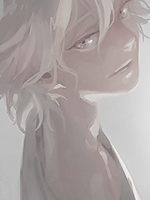
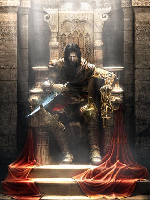
First two render attempts:
You must be registered for see images


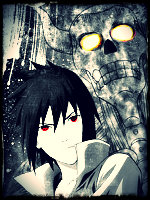
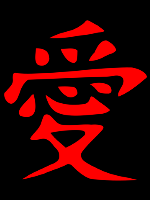
Now the two sig attempts:
You must be registered for see images


Tell me what you think NB & +rep to those with tips for me :)

 

-S-

Legendary Shinobi 🐸
Immortal
Joined
Jan 16, 2011
Messages
41,396
Reaction score
2,409
Hmm... I think the sig are a bit big... but the render are fine ^_^

With the renders, I think you could trim the edges down a bit more, just to lose some of the white ^^
 

~Dream~

Anbu Operative 🎭
Veteran
Joined
Mar 13, 2012
Messages
3,324
Reaction score
398
WOW. That's all I can say man, they are sexy.
 

BasedNaruto

Jōnin Strategist 🧠
Regular
Joined
Jul 9, 2011
Messages
1,459
Reaction score
145
You must be registered for see images
 

Hokage Sharingan Kakashi

Leaf Village Regular 🍃
Regular
Joined
May 17, 2012
Messages
832
Reaction score
125
Nice work :)

Really? Thnx! :)

Hmm... I think the sig are a bit big... but the render are fine ^_^

With the renders, I think you could trim the edges down a bit more, just to lose some of the white ^^

Yes I agree with you, there is way too much white but IDK how to trim it or remove it. I'm still veyr new to this so this is basicly all I could bring to the table.

WOW. That's all I can say man, they are sexy.

Thnx! Their not great(IMO) but I love positive feedback :)

You must be registered for see images

Lol is that good or bad?
 

YowYan

Kage in the Making 👑
Legendary
Joined
Dec 9, 2010
Messages
15,124
Reaction score
1,838
Your 2nd sig comes from a manga page like my avatar.
The background in it doesnt fit, so maybe its an idea to color your 2nd sig like my avy was done
 

ElementNami92

Member
Joined
Jun 15, 2012
Messages
1,848
Reaction score
274
Dude, those are awesome! xd Could you get me a download link to Gimp? :shrug:?
 

Titania Erza

Anbu Operative 🎭
Veteran
Joined
Mar 15, 2012
Messages
3,726
Reaction score
690
The renders are decent, when you are rendering you need to work on pixel level, else there is no reason to render it yourself, you can then better look for a render on the internet.

As for the sigs they lack blending and depth. Instead of messing around on GIMP, I recommend you should start reading tutorials. And the text should never be putted in a corner, but instead near the render/focal point.
 

Melodious

Sannin of the Scrolls 📜
Elite
Joined
Feb 11, 2012
Messages
6,612
Reaction score
900
My advice is that when you're done rendering, go to Image>Autocrop Image. That's to get rid of the excess transparency. ^o^~
And I think you should go look at tutorials ASAP. :)
 

YowYan

Kage in the Making 👑
Legendary
Joined
Dec 9, 2010
Messages
15,124
Reaction score
1,838
The renders are decent, when you are rendering you need to work on pixel level, else there is no reason to render it yourself, you can then better look for a render on the internet.

As for the sigs they lack blending and depth. Instead of messing around on GIMP, I recommend you should start reading tutorials. And the text should never be putted in a corner, but instead near the render/focal point.

Hey! That avy of yours xD long ago i made a gfx request with that exact render lol
200+ viewers and not a single reply -.- it looks good
 

Hokage Sharingan Kakashi

Leaf Village Regular 🍃
Regular
Joined
May 17, 2012
Messages
832
Reaction score
125
Your 2nd sig comes from a manga page like my avatar.
The background in it doesnt fit, so maybe its an idea to color your 2nd sig like my avy was done

I have to practice a lot more and look up tutorials before I can color anything lol xD +rep

Dude, those are awesome! xd Could you get me a download link to Gimp? :shrug:?

Thnx! :) I downloaded Gimp 2 bout a month ago so I don't have a link for you, sorry :(

The renders are decent, when you are rendering you need to work on pixel level, else there is no reason to render it yourself, you can then better look for a render on the internet.

As for the sigs they lack blending and depth. Instead of messing around on GIMP, I recommend you should start reading tutorials. And the text should never be putted in a corner, but instead near the render/focal point.

Tutorials, got it. Thnx! I'll look into the ones here on NB to see if I could get anything. +rep

Really good, just trim the renders a bit.

Thnx, man! +rep
Oh and I had seen your thread a while ago with your sigs & avas and I must say, Good work. Seriously :)

My advice is that when you're done rendering, go to Image>Autocrop Image. That's to get rid of the excess transparency. ^o^~
And I think you should go look at tutorials ASAP. :)

Great Thnx for the advice! +rep

i too just downloaded gimp 2 but still need a lot of time...yours good

Thnx! :) Lol it took me about three weeks to finally try making anything.

i like sig 2

Thnx +rep

Nice work, I will be posting my work in a few so go take a look at it.:)

Okay no prob. When I see your thread I'll check it out! +rep
 

YowYan

Kage in the Making 👑
Legendary
Joined
Dec 9, 2010
Messages
15,124
Reaction score
1,838
My bad, i meant shading not coloring and its actually pretty easy with ps!
 
Top