
You are using an out of date browser. It may not display this or other websites correctly.
You should upgrade or use an alternative browser.
You should upgrade or use an alternative browser.
Messin around with photoshop (a tag)
- Thread starter Fex
- Start date
More options
Who Replied?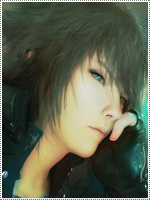


- Joined
- Nov 7, 2012
- Messages
- 38,233
- Reaction score
- 3,030
Very nice

- Joined
- Jun 26, 2014
- Messages
- 3,546
- Reaction score
- 234
CnC incoming:
1.) Add more depth. The same amount of depth is present across the tag, making it look like the entire image is a focal point rather than just the render.
2.) You tried to blend the render in too much. Don't cover his lower torso entirely with the background. Also, don't use the background to blend him in. Use similar colors and do something else with it. I suggest going to sigtutorials.com. At the home page, there should be a tutorial straight away with an elf female as the thumbnail. Go through it and see how the user blends the render in well with the background, without specifically using the background.
3.) Add a light source.
4.) The text placement is fine, but the way it looks is a bit... Meh. You can improve on it.
5.) The colors itself are not very pleasing to be honest. Adding a few adjustment layers should help with that.
Keep in mind I'm looking at this through my phone, so some of my advice might be a little off.
Otherwise, it's fine.
1.) Add more depth. The same amount of depth is present across the tag, making it look like the entire image is a focal point rather than just the render.
2.) You tried to blend the render in too much. Don't cover his lower torso entirely with the background. Also, don't use the background to blend him in. Use similar colors and do something else with it. I suggest going to sigtutorials.com. At the home page, there should be a tutorial straight away with an elf female as the thumbnail. Go through it and see how the user blends the render in well with the background, without specifically using the background.
3.) Add a light source.
4.) The text placement is fine, but the way it looks is a bit... Meh. You can improve on it.
5.) The colors itself are not very pleasing to be honest. Adding a few adjustment layers should help with that.
Keep in mind I'm looking at this through my phone, so some of my advice might be a little off.
Otherwise, it's fine.
Last edited:


- Joined
- Mar 9, 2014
- Messages
- 4,729
- Reaction score
- 62
 NICE WORK :bye: