[Gimp] Goku Avatar

SQY

Anbu Operative 🎭
Veteran
Joined
Jul 10, 2012
Messages
2,932
Reaction score
554
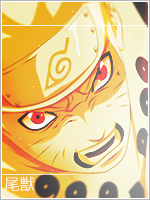
O'k, I waited a while, and thank you all for helping me, this avatar is alittle bit overdone xd, but I really tried to make this one look nice, and btw I need help, why when I put a border in, does it disapear around half way of the picture and not go the full way around?

Goku Avatar:

You must be registered for see images

CnC is it? Please :D
 

Kettei

Kage in the Making 👑
Legendary
Joined
Mar 13, 2012
Messages
10,732
Reaction score
674
Very nice.
 

gordo1

Anbu Operative 🎭
Veteran
Joined
Jun 15, 2012
Messages
4,666
Reaction score
351
Not bad, but it looks like you just pasted a render on a background, threw in a filter and then masked it with a layer of fog.
 

Air

Member
Joined
Nov 5, 2011
Messages
335
Reaction score
50
The border looks a little weird, other than that same thing that gordo1 said.
 

SQY

Anbu Operative 🎭
Veteran
Joined
Jul 10, 2012
Messages
2,932
Reaction score
554
Not bad, but it looks like you just pasted a render on a background, threw in a filter and then masked it with a layer of fog.

I done a shitload more than that tbh,
I changed the colour used brushes to change the hair brightness I also added 2 fractals doubled a background behind the original for more colour sharpened the image 4x in different areas.

So no, I didn't just paste a render on a background, ( Which I also made )
I also attempted a border, darkened his skin, added a brush effect with spirals on the background and changed the saturation to dark/light.
 

Bloo

Symbol of Peace
Immortal
Joined
Feb 4, 2012
Messages
100,708
Reaction score
2,088
Not bad.

And how are you making the border. I might be able to help
 

gordo1

Anbu Operative 🎭
Veteran
Joined
Jun 15, 2012
Messages
4,666
Reaction score
351
I done a shitload more than that tbh,
I changed the colour used brushes to change the hair brightness I also added 2 fractals doubled a background behind the original for more colour sharpened the image 4x in different areas.

So no, I didn't just paste a render on a background, ( Which I also made )
I also attempted a border, darkened his skin, added a brush effect with spirals on the background and changed the saturation to dark/light.

Didn't mean to offend you, just thought I'd give you my honest opinion.:shrug:
 

SQY

Anbu Operative 🎭
Veteran
Joined
Jul 10, 2012
Messages
2,932
Reaction score
554
Didn't mean to offend you, just thought I'd give you my honest opinion.:shrug:

Well tbh, I thought you could of spotted the effects alittle easier.
 

Yuka

Sannin of the Scrolls 📜
Elite
Joined
Aug 29, 2011
Messages
6,485
Reaction score
1,056
its an awesome avatar.
 

Cascade

Jōnin Strategist 🧠
Regular
Joined
May 10, 2012
Messages
1,469
Reaction score
327
i like it best out of all ur other stuff TBH, but i think what Gordo was saying is correct...you may have done a lot more - but if your getting the same appearance of just pasting a render on a bg it still means uve got work to do (even if uve done more).

i cant work from personal experience with GIMP but ive seen some flashy stuff done on it before and im sure you will improve, just keep trying...maybe see if u can make 3-4 avatars and 3-4 signatures and post them on one thread so we can see you improve xD

also you have appeared to 'oversharpen' it - so its gone pixelated in his hair hahaha
 
Last edited:

Rand al'Thor

Anbu Operative 🎭
Veteran
Joined
Jan 13, 2012
Messages
4,684
Reaction score
520
Not bad, but it looks like you just pasted a render on a background, threw in a filter and then masked it with a layer of fog.

this..also more blending is required but nice job i say..:)
 
Top