- Joined
- Feb 23, 2013
- Messages
- 4,604
- Reaction score
- 1,140
[GLOW TUTORIAL]
Go to your AnimeBase profile.
Right-click on one of the boxes (e.g., “Information” or “Profile Posts”) → Inspect Element.
Most of these profile containers use classes like:
This is the selector you’ll style.
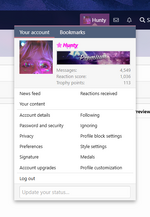
To access the CSS editor for your profile, it will be on the style settings option when you open this window:
There will be several options to choose from. Click the profile style one:
When you are in this tab, scroll all the way to the bottom, and you will see a box called the "CSS editor." The code I have currently is custom for my profile, but you can choose any RGBA color and transparency level you prefer. For further help with that, you can check out this tutorial. [
This CSS code will give the content boxes on your profile a general glow:
This is the code plugged in and working:
If you want a different color glow, I will show you how to do that as well. We will be referring to the
When you see a color you like, like this color:
Copy that highlighted information and find this portion of the CSS code, and fill in the new numbers that correspond with the color:
Click save, and it should look like this:
HAPPY PROFILE CUSTOMIZING!
Go to your AnimeBase profile.
Right-click on one of the boxes (e.g., “Information” or “Profile Posts”) → Inspect Element.
Most of these profile containers use classes like:
.block-container
This is the selector you’ll style.
To access the CSS editor for your profile, it will be on the style settings option when you open this window:
You must be registered to see images
There will be several options to choose from. Click the profile style one:
You must be registered to see images
When you are in this tab, scroll all the way to the bottom, and you will see a box called the "CSS editor." The code I have currently is custom for my profile, but you can choose any RGBA color and transparency level you prefer. For further help with that, you can check out this tutorial. [
You must be registered for see links
]
You must be registered to see images
This CSS code will give the content boxes on your profile a general glow:
Code:
.block-container {
  border-radius: 15px;                     /* rounded corners */
  border: 1px solid rgba(0, 173, 255, 0.5); /* subtle border */
  box-shadow: 0 0 15px 3px rgba(0, 173, 255, 0.7); /* glowing halo */
}
This is the code plugged in and working:
You must be registered to see images
If you want a different color glow, I will show you how to do that as well. We will be referring to the
You must be registered for see links
.When you see a color you like, like this color:
You must be registered to see images
Copy that highlighted information and find this portion of the CSS code, and fill in the new numbers that correspond with the color:
You must be registered to see images
Click save, and it should look like this:
You must be registered to see images
HAPPY PROFILE CUSTOMIZING!
Attachments
-
 1756357119393.png101.8 KB · Views: 1
Last edited: